Kotlin
  C++
C++  C#
C#  Ruby on Rails
  Java
Java  Firebase
  Python
  Vue.js
  HTML5
HTML5  CSS3
CSS3  Azure
Azure 




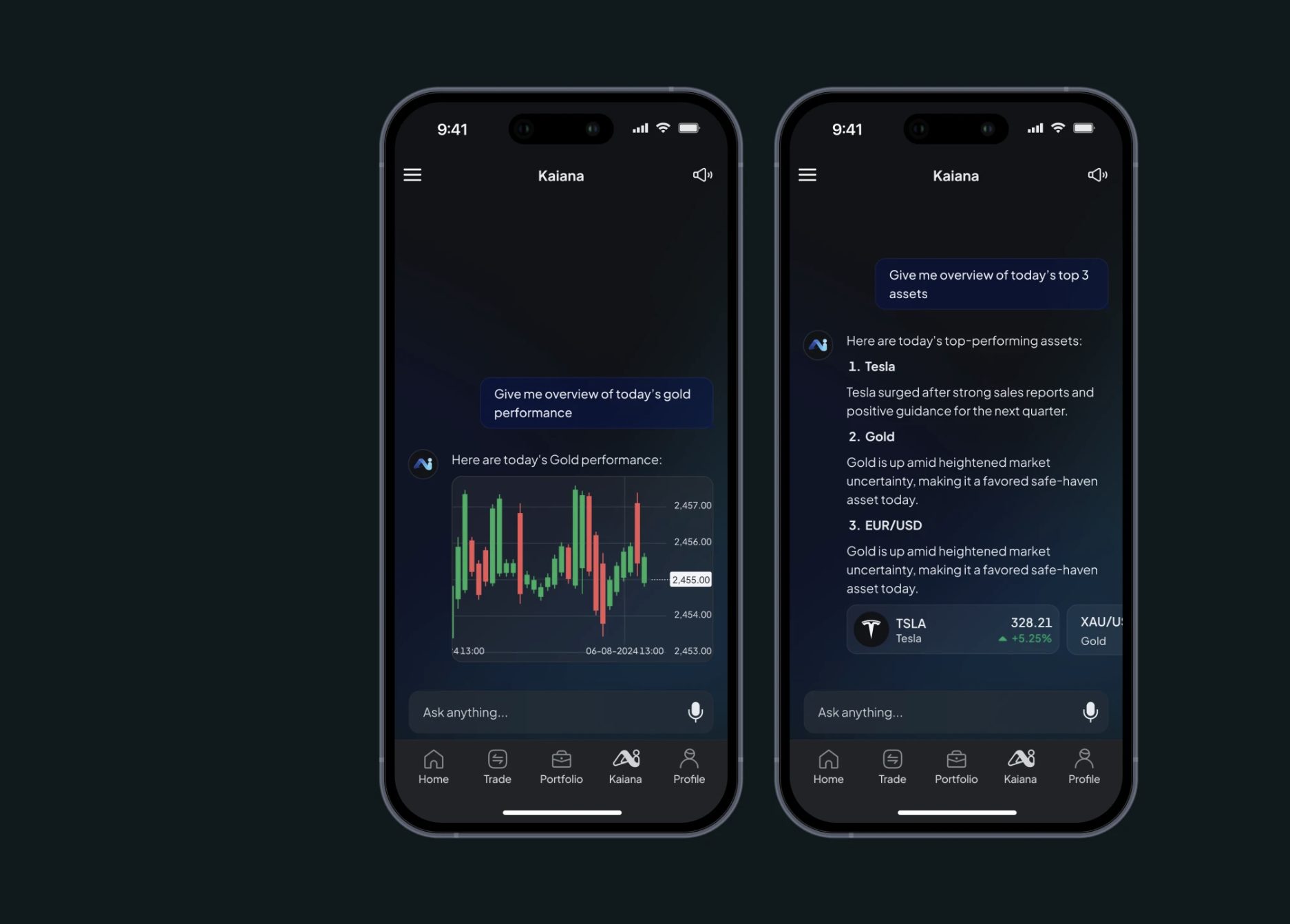

In the months following the release of OpenAI’s API, the market was flooded with “wrappers” – thin interfaces that did little more than resell access to the model. Today, users want more. The data is unforgiving: while top-tier SaaS apps maintain a 40% Day-30 retention rate, many AI-first products struggle to keep even 15% of their users. Successful ChatGPT integration now requires a workflow that solves real problems.
For product owners and CTOs, the challenge is about user engagement and retention. A nicely built AI feature can reduce time-to-value and lower user churn. A poorly executed one creates cognitive friction, leading to frustration.
At Fireart, we approach AI as a design material. We blend AI development with UX principles to create systems that actively solve problems. This article explores how to move beyond the chatbot to build high-engagement product experiences.
Article highlights
The market has shifted from curiosity AI, where users just wanted to see what the bot could say, to “utility AI,” where users demand high-value task completion. As a16z’s 2025 analysis notes, if your integration doesn’t provide a unique, product-specific utility, users will simply revert to using the base ChatGPT app for free.
Natural language will replace complex menus, shifting software from “deterministic” to “probabilistic” UX. This requires managing response anxiety through using streaming text and skeleton loaders.
The value of an integration is measured by the percentage of tasks the AI completes without a human needing to re-prompt. Vertical AI (intelligence integrated into specific niche workflows) is 3x more likely to retain users than generic support bots.
Token costs have reduced, making router architectures a smart move. By using small language models (SLMs) for niche task workflows and reserving flagship models for complex reasoning, companies can improve their margins.
Table of Contents
Why ChatGPT Integration Drives Engagement
The LLM integration into enterprise stacks represents a shift in how software works. For decades, we built deterministic interfaces: a user clicks a button, and a predictable action happens. ChatGPT integration introduces probabilistic computing: the output is creative, variable, and adaptive.
As MIT Sloan Management Review notes, we are entering an era where AI is becoming the primary interface for software. Instead of users having to learn the system by clicking through menus, the system learns to understand the user through natural language, changing the whole cognitive ergonomics of your product.
This shift is a powerful driver for user engagement because it collapses the time-to-value.
- Instead of clicking through five filters to find a report, a user can ask, "Show me sales in EMEA for Q3." The interface adapts to the intent instantly.
- By moving from rigid forms to conversational UI, we reduce the mental effort required to perform tasks.
- AI-enhanced interfaces can personalize their tone, adapt complexity and content based on the user's history and behavior.
However, this power comes with UX risks. If the AI is slow or inaccurate, it kills trust. Successful ChatGPT integration today manages these risks and signals the end of static software and the beginning of adaptive, intelligent products.
Key Principles of High-Engagement ChatGPT Integration
Simply pasting an API key into your code does not guarantee success. To build a custom ChatGPT solution that users adopt, use core product principles that prioritize clarity and trust.
Start with a Clear User Journey
Don't just add a chatbot because it's trendy. Identify friction points in your current product. Where do users drop off? Where do they open a support ticket?
❌ A generic chat bubble on every page.
✅ A contextual "Help me write this" button inside a text editor, or "Explain this chart" button on a complex dashboard.
Manage Latency
AI can be slow. A complex reasoning task might take 10 seconds, which is an eternity in web UX. Manage this wait to keep engagement high.
To fix this, we use streaming (text appearing character-by-character) to give the user immediate feedback. This keeps the user's attention while the model finishes thinking.
Balance Automation and User Control
Users fear losing control. They want to review everything AI does.
Solution is human-in-the-loop features. Always frame AI outputs as "Drafts" or "Suggestions." Give the user easy buttons to Accept, Edit, or Regenerate.
Prioritize Data Safety and Compliance
Trust is the must-have of AI. If enterprise users suspect their data is unsafe, they won't use the feature.
Solution is guardrails. Implement middleware that scans prompts for personally identifiable information (PII) before it hits the chatGPT API integration. Explicitly tell users, "Your data is not used to train public models."
Unsure where AI fits in your user journey? Book a 30-minute discovery call to map the ideal AI touchpoints.
Contact FireartHigh-Impact Use Cases of ChatGPT Integration
Where does ChatGPT integration deliver the highest ROI? Increasingly, the baseline for high engagement is moving beyond text. a16z identifies multimodal interaction (letting users upload screenshots of errors or speak commands while working) as a primary driver for product stickiness.
The real value lies in accelerating complex workflows and moving from passive answers to active assistance. As Menlo Ventures' 2025 report highlights, vertical AI, which is intelligence integrated into a specific niche workflow, is 3x more likely to retain users than generic horizontal chat bubbles.
Here are the strategic scenarios where we see measurable engagement growth.
1. AI-Driven Onboarding
Static product tours are often ignored. An AI-driven onboarding assistant acts as a tutor. Instead of forcing a user to watch a generic video, it asks, "What are you trying to achieve today?" and then helps configure the dashboard specifically for that goal. This dramatically reduces Day-1 churn.
2. Smart Customer Support
Modern users want instant 24/7 support. By deploying RAG-based (retrieval-augmented generation) customer support agents, you offer exactly this. Unlike old chatbots that get stuck in loops, these agents read your live help docs to answer complex queries like "Why did my payment fail?", reducing support ticket volume.
3. The Co-Pilot for Content
For SaaS platforms, the “blank page” problem is a major engagement killer. An AI co-pilot helps write text relevant to the context. In a CRM, it might draft an email based on the client's last three interactions. This keeps users in the flow state inside your product, increasing session duration.
4. Semantic Search
Standard keyword search fails when users don't know the exact file name. ChatGPT integration enables semantic search. A user can type "Show me the invoice from last week about the coffee machine," and the system understands the intent, finding the correct document even if the file is named INV-2024-001.pdf.
5. Data Storytelling with Narrative Widgets
We are moving toward what a16z calls the ephemeral UI. Instead of a static dashboard, the system generates a custom widget or chart based on a specific user query, serves the insight, and then disappears. We see success integrating narrative widgets – small text blocks where ChatGPT analyzes a chart and explains, "Revenue is down 5% primarily due to a drop in the EMEA region." This instantly translates raw data into insights for non-technical users.
6. Agentic Workflows
This is the new frontier of building AI agents – workflows that take action, moving beyond a text chat.
- Chatbot: "Here is how you process a refund: [Link to refudn policy]"
- Agent: "I have processed the refund for Order #123. Shall I send the confirmation email?"
Integrating these capabilities makes your product indispensable. The new North Star metric is agency. According to Menlo Ventures, we are no longer measuring session length, but rather the percentage of tasks the AI completes from start to finish without requiring the user to re-prompt or fix the output.
UX/UI Tips to Make Engaging ChatGPT Features
Integrating AI introduces new interface challenges. The standard design patterns that work for static forms often fail for dynamic AI interactions. To make ChatGPT integration feel native, we must prioritize the psychology of waiting and trust. Below you will find the common problems and fixes for them.
Reduce Response Anxiety
AI inference takes time. A complex answer takes 5-10 seconds to generate. A static spinner during this wait feels broken. We use two fixes for that:
- Streaming text. Displaying the response character-by-character, like a typewriter, cuts the perceived wait time to near zero.
- Skeleton loaders. For tables, use shimmering skeleton screens to prime the user's eye for the layout before the data arrives.
Make Fail States Friendly
AI will occasionally refuse a prompt or hallucinate. A generic Error message is a dead end.
- Guided recovery. If the AI cannot answer, offer alternatives. "I can't summarize this 50-page PDF, but I can summarize the first 10 pages. Would you like me to do that?" This keeps the user in the flow.
Use Memory to Personalize
Nothing kills engagement faster than an amnesiac AI. Users expect the bot to remember what they said five minutes ago.
- Visual memory cues. Show a small indicator like "Remembering your preference for concise answers." This reassures the user that the system is adapting to them.
Visual Trust Signals
In enterprise contexts, blind trust is a risk.
- Citations. If your AI provides a fact, it should cite the source. Use footnote-style links (e.g., ¹) that hover to show the source document. This transforms the AI into a verifiable research assistant.
Technical Strategy: Integrating Without Hurting UX
The technical challenge of how to integrate ChatGPT is balancing intelligence with cost and speed. Sending every user interaction to the most expensive model will erode your margins and slow things down.
Strategic integration requires a more nuanced architecture.
The Router Architecture
Not every query requires a PhD-level intelligence. Using GPT-4o for simple tasks is overkill.
Instead, implement a model router. This layer analyzes the user's prompt complexity and picks an action accordingly.
- Simple tasks (Greetings, Summaries) → Route to a cheap model (e.g., GPT-4o-mini).
- Complex tasks (Reasoning, Coding) → Route to the flagship model.
This approach can reduce inference costs by up to 60% while speeding up response times for the majority of users. It is made possible by a massive shift in AI economics: the Stanford HAI 2025 AI Index notes that the cost of high-reasoning tokens has dropped by nearly 90%, while performance has surged. By using a router, we can leverage this low cost to provide top-level intelligence only when the user truly needs it, protecting product's margins.
This also aligns with the strategic shift toward specialization. MIT analysts predict that the next phase of enterprise AI will rely on small models (SLMs), harnessed for task-specific workflows, providing higher privacy and lower latency than a standard API call.
Semantic Caching
Why generate the same answer twice? Traditional caching relies on exact keywords, but semantic caching understands intent.
- How it works: If User A asks "How do I reset my password?" and User B asks "Forgot password steps," the system recognizes that the intent is identical and serves the pre-generated answer instantly.
This reduces API calls and makes the ChatGPT integration feel lightning fast for common queries.
Guardrails and Middleware
Before a prompt ever reaches OpenAI, it should pass through a security layer.
- Input filtering detects and redacts PII to ensure GDPR compliance.
- Output moderation scans for toxicity or competitor mentions to protect brand safety.
By treating the API as just one component of a larger intelligence system, you build a product that is fast, safe, and scalable.
However, the ultimate UX bottleneck is often data readiness. As MIT Sloan emphasizes, if your data pipelines are siloed or unorganized, even the best ChatGPT integration will feel slow to the user. Success requires preparing your data infrastructure to be AI-ready.
Success Indicators to Measure Engagement Gains
How do you know if your ChatGPT integration is working? Don't be fooled by high chat volumes, as they might just mean users are confused and asking for help repeatedly. Real success is measured by the retention uplift of AI users versus non-users.
- Deflection rate. For support bots, what percentage of queries are resolved without a human?
- Time-to-value. How much faster does a user complete a complex task with AI vs. the old UI?
- Retention uplift. Do users who engage with the AI features have higher Day-30 retention than those who don't?
- Acceptance rate. For Co-Pilot features, how often does the user keep the AI's suggestion vs. deleting it?
By focusing on these metrics, you validate that the AI is solving problems, not just generating text.
Since multimodal interaction is now the baseline, your success is also defined by how you connect user intent and business results. If your AI features save that essential hour of work, your retention will be among high-performers.
Conclusion
AI is not a novelty anymore. Today, ChatGPT integration is a competitive necessity. But rushing a chatbot to market won’t do. The winners will be those who treat intelligence as a design material, sculpting it with UX principles to be genuinely helpful.
Faster value and reduced friction are the real dividends of AI.
Let’s build an AI-enhanced product your users will love. Fireart’s engineering and design teams are ready to help you shift to intelligent interfaces.
Contact Fireart todayFAQ: Common Questions About ChatGPT Integration
How do I know if my product really needs ChatGPT integration?
If your users struggle with complex workflows, blank page syndrome, or finding information in large datasets, AI can help. If your app is a simple utility, like a calculator, AI might be overkill.
Is ChatGPT safe for enterprise products?
Yes, but only with the right architecture. We use enterprise guardrails to ensure your proprietary data is never used to train public models. We also implement PII masking to meet GDPR/SOC2 standards.
How much does it cost to integrate ChatGPT into a web or mobile app?
Costs vary based on complexity. A simple chatbot is relatively low-cost, while a custom ChatGPT solution with RAG and semantic search requires a larger investment in backend infrastructure.
How long does a typical integration project take?
A basic integration can be prototyped in weeks. A full enterprise-grade system with RAG, testing, and UI typically takes 2–3 months to launch safely.
Do you provide prompt engineering and UX design for ChatGPT features?
Yes. We handle the full lifecycle, from designing the conversation flows (UX) to optimizing the system prompts (Engineering) to ensure the AI behaves as intended.