

The tech industry historically treated web accessibility as an afterthought – a compliance checklist handed to developers right before launch. Today, this approach is a liability.
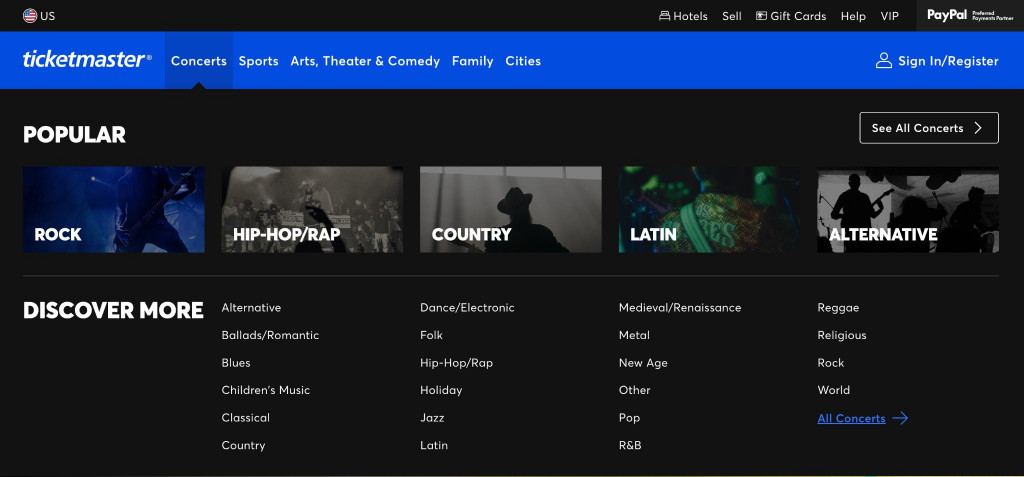
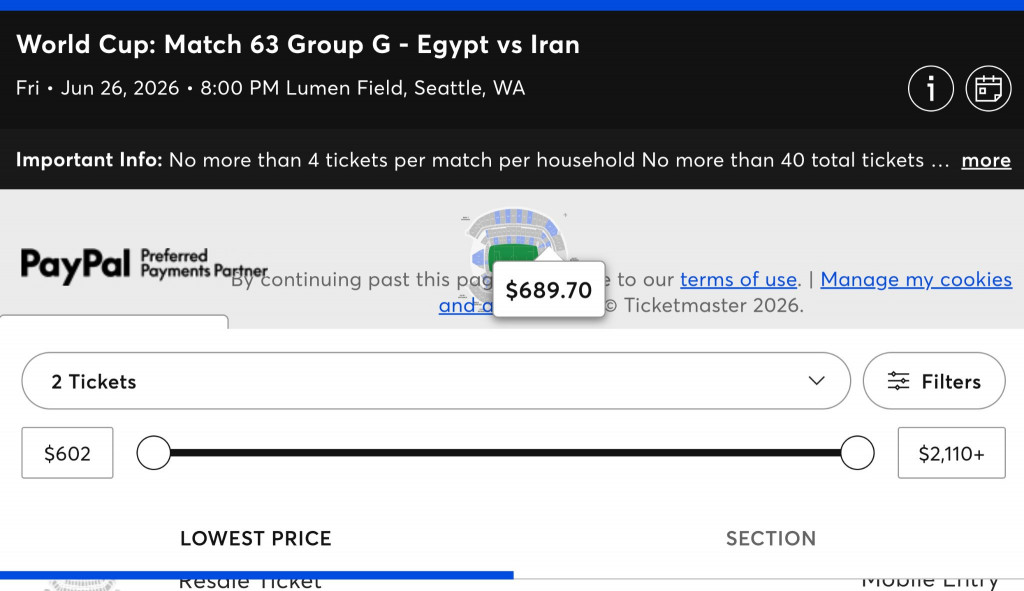
Basically it is hard to find good examples. Every popular site you are going to visit, especially in gaming and e-commerce, will have bad examples.
Look for signs in:
- Alt texts & text in Images
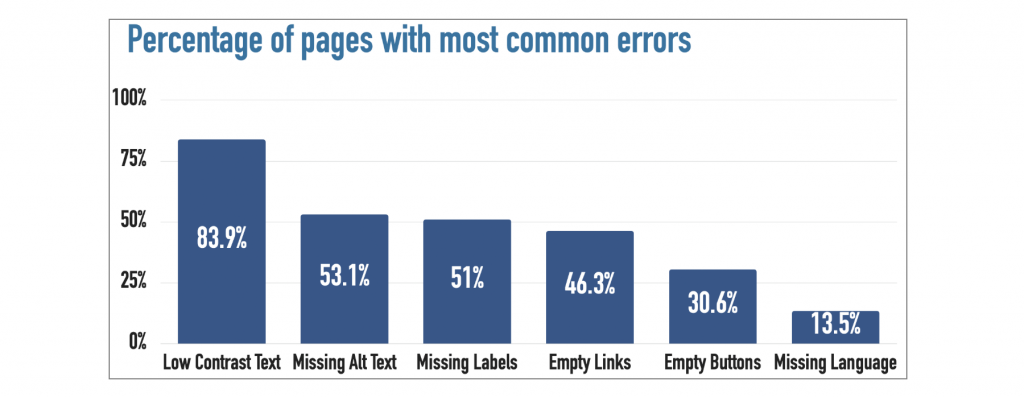
- Use of color & low color contrast
- Issues when changing settings, mainly text size & zoom level
- Animations & videos
Digital inclusion dictates revenue, brand trust, and market share. When an application is difficult to navigate with a screen reader, lacks keyboard support, or uses poor color contrast, it introduces friction for everyone and leaks potential revenue.
At Fireart, we approach accessibility as a user experience discipline. Whether we are modernizing legacy applications or launching a product from scratch, inclusive architecture ensures your product is structurally sound, and comfortable for everyone.
The business case for accessible web design relies on understanding common pitfalls and the architectural principles required to build inclusive platforms.
Article highlights
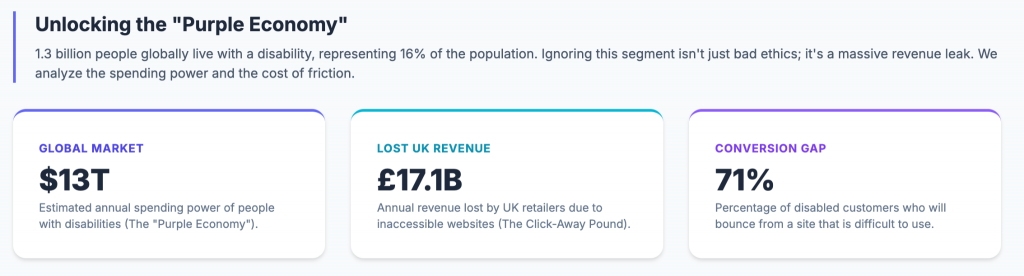
- The global disability community commands an estimated $13 trillion in disposable income. Still, 71% of these users will abandon an inaccessible website.
- Accessibility is a prerequisite for SEO. The semantic HTML structure required by screen readers is what Large Language Models (LLMs) need to parse and index your site for AI-driven search.
- Automated overlay widgets fail. Attempting to fix code failures with a JavaScript overlay is technically flawed and attracts ADA compliant website lawsuits.
- Integrating accessibility during the initial development phase costs 67% less than retrofitting a non-compliant product after launch.
Table of contents
Create digital experiences everyone can use. Our design and development team helps you build accessible products that drive business growth and expand your market reach.
Explore our Product Design ServicesWhy accessibility is no longer optional in modern web development
Ignoring accessibility turns customers away.
The World Health Organization estimates that 16% of the global population – 1.3 billion people – experiences a disability. This demographic, known as the Purple Pound, represents a largely untapped market. According to Click-Away Pound research, British retailers lost an estimated £17.1 billion (roughly $22 billion) annually when disabled customers abandoned websites they found difficult to use. Their business went to competitors who invest in inclusive web design.
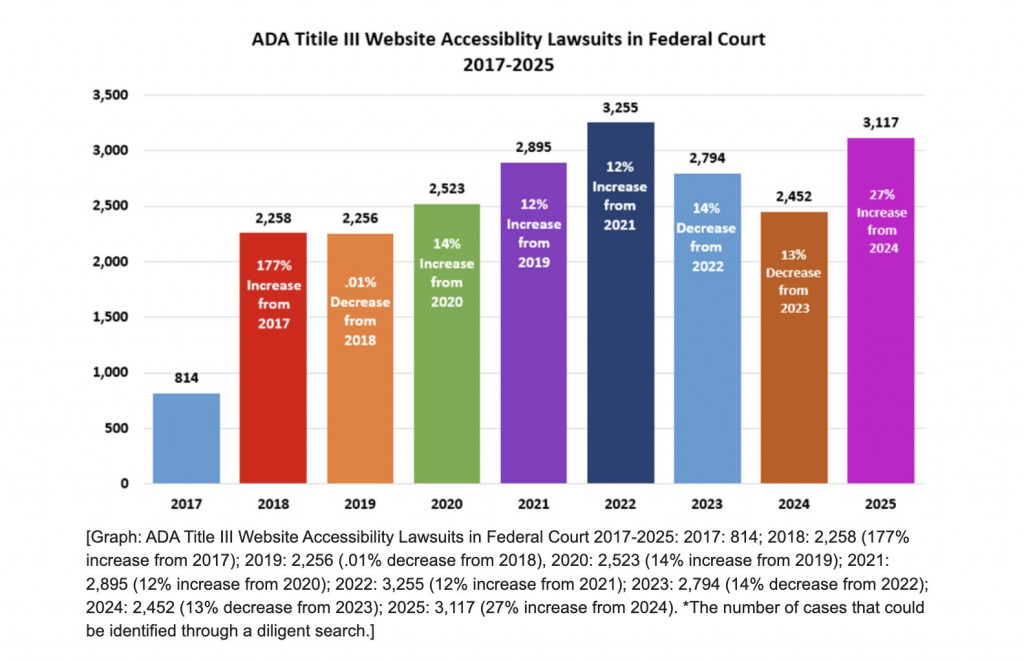
Beyond lost revenue, the regulatory landscape is closing in. We are seeing a wave of litigation. In the US, thousands of federal lawsuits are filed annually under ADA Title III, targeting inaccessible digital properties. In Europe, the European Accessibility Act (EAA) enforces financial penalties for multinational businesses, with some national laws levying fines reaching €600,000 for infractions.
Relying on default design frameworks lets these risks accumulate. To capture market share and avoid litigation, accessibility in web development is a foundational requirement.
Why web accessibility matters for business growth
Product teams must view accessibility as a commercial strategy. By removing barriers that prevent users from interacting with your product, you impact bottom-line metrics. An inclusive approach to engineering translates into business value.
A better user experience means higher retention
Friction hurts conversion. When users encounter a site that is difficult to read or navigate, they abandon it.
Building an accessible user experience benefits everyone, a phenomenon known as the curb-cut effect. Ensuring high color contrast helps users with visual impairments and aids a mobile user reading your website outdoors in sunlight.
Implementing strict keyboard navigation assists users relying on assistive technologies or screen readers while allowing power users to navigate forms quickly without reaching for a mouse.
Designing with cognitive disabilities in mind creates cleaner layouts that speed up task completion for your entire audience. This requires building responsive interfaces and logical, accessible navigation structures that guide the user. An investment in inclusive UX design lowers your bounce rate and keeps your customers in the funnel.
SEO performance and the AI search era
Search engine optimization and accessibility share the same technical foundation.
Search crawlers like Googlebot lack eyes; they perceive your website identically to how screen readers do – by parsing the code. When developers use semantic HTML, such as logical <H1> through <H6> tags and descriptive image alt text, they hand search engines a formatted map of the page’s ontology. It is a core pillar of web design best practices. Accessible websites rank for up to 27% more keywords than their non-compliant competitors.
| Fireart tip: Update your website with llms.txt file to help AI tools and boost the GEO readability. |
We are entering the era of AI-driven search, dominated by tools like ChatGPT and Perplexity. Large Language Models (LLMs) rely on clean data structures to extract and summarize information. If your site lacks semantic integrity, AI agents struggle to read it, dropping your brand out of the AI search ecosystem.
Reduced legal and compliance risks
Digital litigation is an industrialized process. Plaintiff law firms deploy scraping bots across the internet to identify brands that fail basic accessibility requirements for websites.
Website accessibility lawsuits accounted for 36% of the total number of ADA Title III lawsuits filed in federal court in 2025 (3,117 out of 8,667 cases), targeting mid-to-large e-commerce entities. Nearly half of these cases involve repeat defendants.
Internationally, the stakes are higher. With the enforcement of the European Accessibility Act (EAA), any multinational business operating within the EU faces financial penalties.
Achieving WCAG compliance is the only sustainable defense. Knowing the most common mistakes for accessibility in web development and shifting your engineering mindset toward accessible design acts as a legal shield, protecting your brand reputation and your balance sheet from litigation.
The automated overlay trap: A common accessibility mistake
When faced with compliance deadlines, businesses look for a shortcut. The most common shortcut is the automated accessibility overlay.
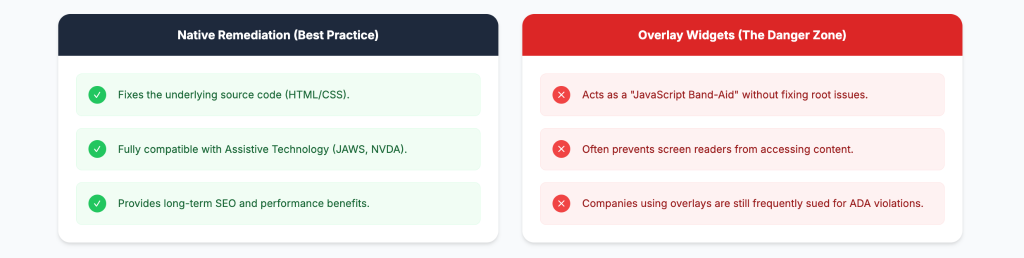
Overlays are third-party JavaScript widgets appearing as an accessibility icon in the corner of the screen that promise compliance by injecting an interface layer over the website. They are a legal and technical liability.
Because these widgets inject JavaScript after the initial page load, they fail to modify the underlying Document Object Model (DOM). Assistive technologies, like native screen readers, bypass the visual layer and read the original HTML source code. They overlook the overlay’s fixes. In some cases, the injected code clashes with the user’s personal screen reader settings, making the website unusable for them.
Major disability advocacy groups, including the National Federation of the Blind, have issued formal resolutions against these tools, classifying them as harmful.
From a legal perspective, installing an overlay widget paints a target on your back. Plaintiff firms know a widget indicates a company is cutting corners without fixing its core code.
True web accessibility guidelines require structural integrity. Relying on an overlay is a fundamental misunderstanding of website accessibility best practices.
Key principles of accessible web design
To build an inclusive web design, we must treat accessibility as a core architecture. This means integrating compliance directly into your development lifecycle, long before the QA.
At Fireart, we find the most impactful equal access failures are straightforward to fix if caught early. Here is how we engineer around three structural principles.
Making content easy to perceive
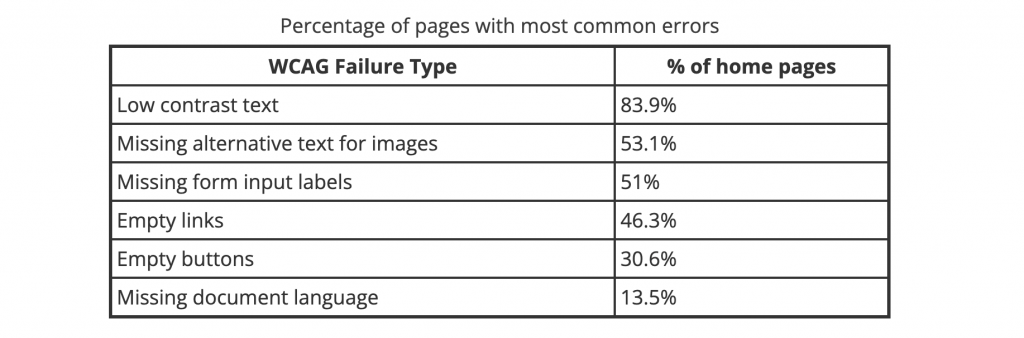
The human eye requires contrast to separate a signal from background noise. A mistake we see in minimalist user interfaces is poor color contrast – using light gray text on a white background, or white text inside a light blue button.
To meet WCAG guidelines (link below), regular text must have a minimum contrast ratio of 4.5:1 against its background. Core exception is large text that is at least 18pt (24px) or 14pt bold (18.66px bold) — it only requires a 3:1 ratio.
Test these ratios across all interactive states, including hover and disabled modes.
Failing to meet WCAG metric hurts conversion rates when users cannot read your call-to-action on a dimmed mobile screen. A quick test to see if your text is readable: imagine looking at your screen wearing sunglasses in the bright sun.
– Kostia Varhatiuk, Head of Design, Fireart Studio
Eliminating the keyboard trap
Many users, including those with motor disabilities or visual impairments, navigate the web without a mouse, relying on the Tab, Spacebar, and Enter keys.
A structural failure in web accessibility standards is the keyboard trap. This happens when a user navigates into a component – like a custom date picker or a modal pop-up – and cannot navigate back out using the keyboard. They are locked inside the element.
Fixing this requires strict JavaScript event handling. When a modal opens, developers must ensure focus is directed inside the modal, and pressing the Escape key dismisses it, returning the user to where they started. Every interactive element must have a visible focus indicator, so keyboard users know exactly where they are on the page.
Moving beyond placeholder text
Relying solely on HTML5 placeholder text inside form fields is a common usability failure.
When a user with cognitive disabilities – or a distracted user on a mobile device – starts typing, the placeholder text vanishes, removing the instructions. Many assistive technologies do not reliably read placeholder attributes, leaving the user guessing what information is required.
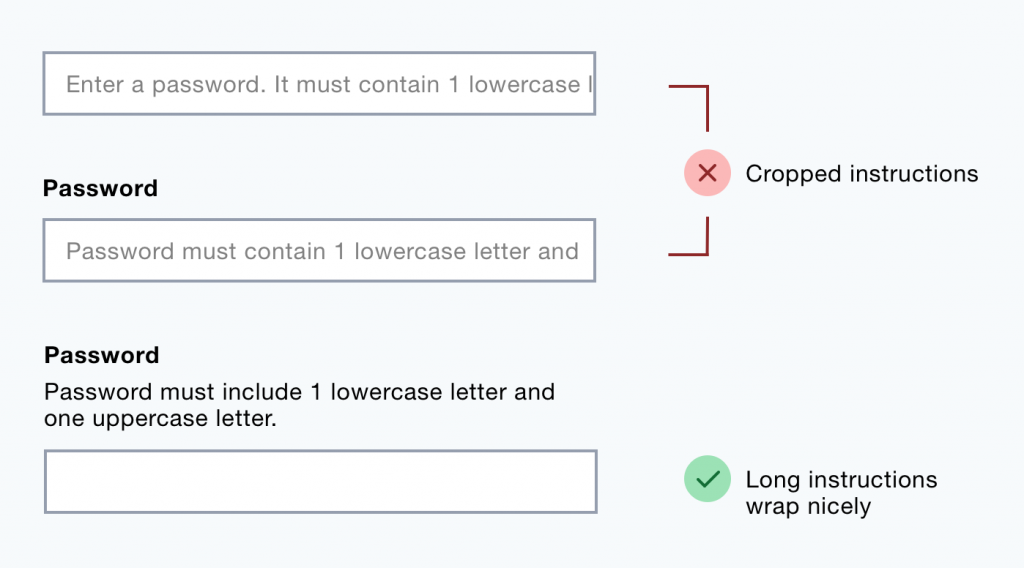
Every input field must have a permanent <label> associated with it. This rule of digital accessibility directly improves form completion rates
Stop losing users to bad UX. Fireart can audit your architecture, modernize your interfaces, and ensure your website is compliant and optimized for conversion.
Discover our Product Design ServicesHow to make a website accessible from day one
You build an accessible website by integrating it from the beginning.
If building from scratch, developers and designers must follow WCAG standards during sprint cycles. This means writing clean semantic HTML, enforcing contrast ratios, and building a culture of accessibility in web development. Ensuring compliance is an ongoing process of quality assurance, requiring checks during every release to prevent code regressions.
For an existing product, comprehensive accessibility audit can be a start. Automated software scanners catch only about 30% of code errors. True accessibility testing requires human evaluators testing the site manually using screen readers and keyboard-only navigation to find friction points that bots miss.
How Fireart Studio helps build accessible digital products
At Fireart, we build accessibility into the product’s foundation.
When modernizing a legacy app or building a new platform, we follow web accessibility guidelines.
Fireart team integrates accessibility standards with the latest UI UX design trends, so it works great while looking good.
Ask us about scalable web accessibility solutions that protect your business, boost your search visibility, and capture the revenue other companies miss.
Don't leave revenue on the table. Let's build a digital product that works flawlessly for every user, and grow your bottom line.
Contact Fireart Studio todayThe Guidelines, Standards, and Tools for Web Accessibility
Web Content Accessibility Guidelines (WCAG) 2.1 Overview – W3C-WAI
Guide to the Section 508 Standards – US Access Board
Accessibility Tools
- Chrome Accessibility Tools – Chrome Extension (Mac/Win)
- Color Contrast Analyzer – Chrome Extension (Mac/Win)
- Color Oracle – App (Mac/Win/Linux)
- I want to see like the colour blind – Chrome Extension (Mac/Win)
- NoCoffee – Chrome Extension (Mac/Win)
- Sim Daltonism – Desktop App (Mac/iOS)
- WAVE Toolbar – Chrome Extension (Mac/Win)
- WCAG 2.0 Colour Contrast Analyser (CCA) – By The Paciello Group, Desktop App (Mac/Win)
- Web Accessibility Toolbar (WAT) – By The Paciello Group, IE Extension (Win only)
- Material Design Color Tool
- Contrast Ratio by Lea Verou
- Tanaguru Contrast Finder help for finding a close color with good contrast.
- ChromeLens, Chrome extension to develop for the visually impaired
- Google’s Lighthouse (automated tool, accessibility section)
- Accessibility Evaluation Tools – An Overview
- Color Contrast Checker
- WebAim Review of CommonLook Section 508 Plug-In for Adobe Acrobat
- WAVE Web Accessibility Evaluation Tool
Conclusion
Web accessibility is a a strategic asset, that helps businesses unlock revenue.
Accessible website creates a frictionless user experience that grows your business and enhances customer loyalty.
FAQ: Common questions about web accessibility
How does web accessibility directly impact my site's conversion rates and ROI?
Inaccessible websites create friction, forcing users to abandon their journeys. By implementing accessible web design, you capture the $13 trillion in disposable income held by the global disability market, lowering bounce rates and reducing the operational costs of customer support calls.
What is the technical difference between ADA compliance and WCAG 2.1 Level AA?
The ADA (Americans with Disabilities Act) is the legal mandate prohibiting discrimination. The WCAG guidelines (Version 2.1 or 2.2 Level AA) are the technical standards you follow in code and design to achieve an ADA compliant website status.
Can accessibility improvements boost my SEO?
Search engine crawlers navigate websites exactly like assistive technologies do. Restructuring your site with semantic HTML, logical heading hierarchy, and proper alt text to achieve WCAG compliance provides search engines with a mapped document, boosting organic keyword rankings.
Are AI-powered accessibility overlays good for legal protection?
Major advocacy groups and federal courts find these third-party JavaScript widgets fail to fix the underlying source code parsed by native screen readers. Relying on them is a technical trap that attracts accessibility lawsuits.
How will the 2025 European Accessibility Act (EAA) affect companies headquartered outside of Europe?
The EAA operates on an extraterritorial basis. If your multinational business operates, sells products, or provides digital services to consumers within the EU, you are legally subject to the EAA. Failure to meet these accessibility requirements for websites results in administrative fines from member states.
How can I conduct an accessibility audit without incurring a total site rebuild?
Start with a hybrid accessibility audit that identifies quick-win code repairs, like correcting color contrast, removing keyboard traps, and fixing form labels. An engineering team can retrofit these web accessibility standards into existing codebases through strategic legacy app modernization.







 Kotlin
  C++
C++  C#
C#  Ruby on Rails
  Java
Java  Firebase
  Python
  Vue.js
  HTML5
HTML5  CSS3
CSS3  Azure
Azure